Using Formcentric Connect in SiteArchitect
Last updated:
With Formcentric Connect for FirstSpirit, you can embed forms from your Formcentric account directly onto your FirstSpirit pages in SiteArchitect, without switching between applications. Any changes you make to a form in Formcentric are reflected on your website as soon as the form is published in Formcentric. No republishing in FirstSpirit is required.
Opening Formcentric Connect
Open the FirstSpirit project in which Formcentric Connect is installed. In the vertical toolbar, locate the Formcentric Cloud icon (3) in the Organize section. Click the icon to open the Formcentric Cloud report.
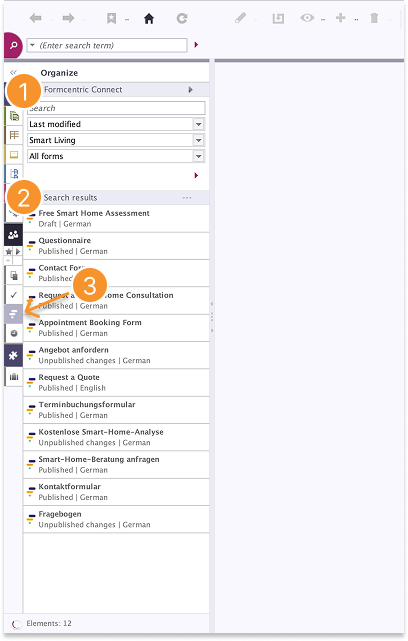
The Formcentric Connect report
The report displays all forms from your Formcentric account (2). Each form shows its current status and language.
Want to narrow down the list? Use the search field or apply filters in the header area (1). You can sort forms by Last Modified, Name (A–Z), or Name (Z–A), filter by folder, or show only Published Forms, Unpublished Forms, or All Forms.
Clicking a form in the report opens it directly in the Formcentric editor, where you can make changes.
The arrow icon in the top right of the header area (1) gives you access to the following options:
- Create New Form – Opens Formcentric so you can create a new form.
- Open Form Overview – Takes you to the overview of all your forms in Formcentric.
- Open Help centre – Takes you directly to this Formcentric Help centre.
Embedding a form on a page
- In the toolbar, click Explore and select Content.
- Navigate in the content tree to the content area where you want to embed the form.
- Right-click the content area and select New > Insert Paragraph. A dialog box opens.
- Open the folder Paragraph Templates > Formcentric Cloud and select the Formcentric Cloud Form template.
- Click Select. The new paragraph template appears in the content tree.
- Click the newly created paragraph template in the content tree to display its details on the right.
- Click the plus icon (+) to add a form. A dialog box opens showing all available forms.
- Use the search field or filters to find the desired form.
- Click the form and confirm by clicking Select.
The form is now embedded and displayed within the paragraph template..
Replacing a form
Each paragraph template can contain only one form at a time.
To replace an existing form:
- Click the Formcentric Cloud Form paragraph template in the content tree.
- In the details area on the right, remove the existing form by clicking the minus icon (-).
- Click the plus icon (+) to select and add the new form.
You have successfully replaced the form.